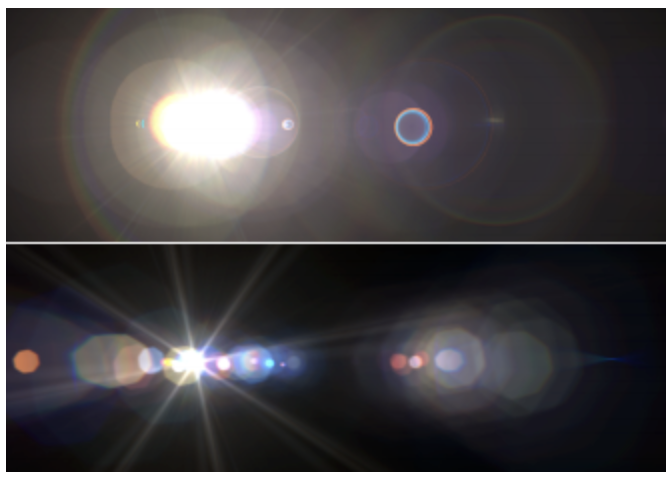
In this project, we aim to add a feature to an existing rendering engine to generate renders of synthetic lens flare distortions. This will involve defining a light source and a camera with key characteristics and parameters, and simulating the physics behind lens flare distortions. By the end, we hope to have a customizable feature in a rendering engine that will allow users to toggle lens flare istortions in rendered scenes with a powerful light source like the sun.
There does not seem to be a common, physically accurate rendering/ray-tracing engine that supports dynamic lens flares (created from the available light sources). Currently, there are applications that generate 2D lens flares like After Effects, where the popular lens flare feature is performed during film post-processing, and Photoshop which adds lens flare effects to anywhere on the image. In contrast, actual 3D modeling software like Cinema 4D and Blender do not have reliable lens flare generation features. For example, Cinema 4D only has a feature to render light sources with protruding flares but not a feature for rendering other lens flare artifacts that distort the overall render. Additionally, none of these utilizes ray tracing, so realistic lens flares in scenes cannot be dynamically generated.
We intend on resolving these drawbacks in 3D software by implementing a feature within existing rendering engines that can render physically-based lens flare distortions. First, we plan on creating a mathematical model that will help capture the polarization of light and the radiance from the light source through a pixel of the image. Then, we hope to add additional features that model the anisotropic behavior of lens flares that result from the rugged microscopic camera surface or from oils from your hand getting on the lens. Finally, we hope to make this feature more interactive by being able to move the camera around the scene to visualize how the lens flare distortions change in the image.
After reimplementing the “Physically-Based Real-Time Lens Flare Rendering” paper, we should be able to reproduce the colors and patterns of a typical lens flare. The results should look something like this when the camera is pointed towards the light source in an empty scene:
As stated in our overview, we plan to have these distortions be parameterized. This means that the end-user will be able to choose, for example, the location, size, and intensity of the light source. To this end, we plan on providing a visual analysis of how these rendered distortions change as we change we vary the parameters.
The lens flare distortion partly depends on the organization and architecture of the lens within the camera. There are many possibilities for the lens arrangement and so we plan to implement a couple different ones. An example of how the distortions change as a result of lens arrangement is shown below:
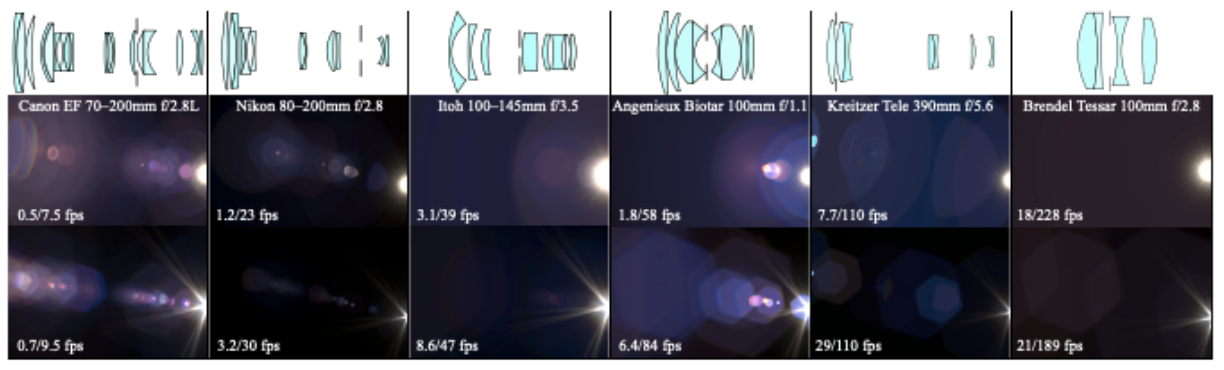
We hope to implement cool effects like this “Ghost #103” lens aberration only if time permits.
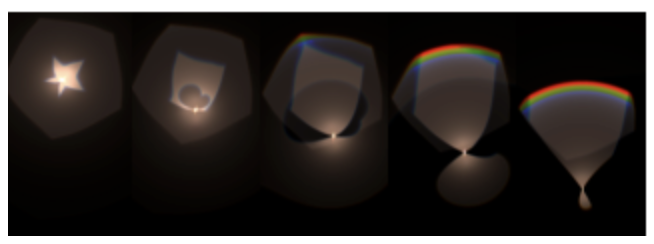
Next, we will model dirty lens effects like the image below. Although it is not apparent at first glance, the lens has some small dust and dirt particles on it that are creating the lens flare artifacts that are present throughout the image.
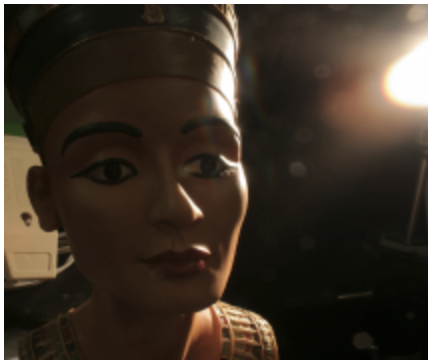
Additionally, we will model the isomorphic effect that occurs when you wipe your finger one way across a screen. We do not know the actual science behind this, but something we found is that if you wipe a lens in a certain direction (i.e. vertical), the lens flare will actually display in the opposite direction (i.e. horizontal). We believe this is because the lens is covered with small amounts of grease/oil that mimic a sort of rugged texture on the lens. We believe that the direction of this microscopic rugged texture determins the direction of lens flares protruding from light sources. An example of this is shown below. Notice the lens flares are horizontal, so we believe the camera may have a vertically aligned anisotropic surface.
In what we plan deliver, we intend on modifying a render engine to simulate lens flare distortions in static viewpoints. As an additional stretch, we hope to deliver a subsequent unique feature that allows the end-user to interactively change the camera viewpoint. By doing so, we hope that we can properly simulate how the lens flare would change as the camera changes direction relative to the light source. We were unable to find a suitable GIF or video that best represents what hope to implement, but the basic idea is attempting to model lens flare distortions in real-time as the viewpoint changes.
| Week # | Milestone to Reach |
|---|---|
| Week 1 (Apr 13 - Apr 20) | Understand the concepts and existing code: 1. Have a grasp on the math and physics behind lens flares by using the scientific papers listed below 2. Have Mitsuba 2 fully-functional on any machine and be able to properly use the Python Interface 3. Understand the Mitsuba 2 architecture 4. If the above (2-3) fails, we will resort to using Path Tracer |
| Week 2 (Apr 20 - Apr 27) MILESTONE DUE |
Basic lens flare implementation: 1. Transform the physics-based formulas into code that the chosen render engine can utilize 2. Render scenes with a visible, physically accurate lens flare |
| Week 3 (Apr 27 - May 4) | Extend the bare lens flare implementation: 1. Add anisotropic effects that change the direction of the lens flares based on the property of the camera lens and the polarization of light 2. Add the ability to move the camera viewpoint interactively and be able to visualize how the lens flare moves/changes as a result. |
| Week 4 (May 4 - May 11) PRESENTATIONS - MAY 6 DELIVERABLES - MAY 11 |
Prepare project presentation and deliverables: 1. Finalize the project implementation 2. Create renders of scenes with lens flare distortions for illustration 3. Finish the project presentation BY MAY 6TH 4. Finalize deliverables (website) BY MAY 11TH |
“Physically-Based Real-Time Lens Flare Rendering” by Hullin et al
Published in SIGGRAPH 2011
https://dl.acm.org/doi/10.1145/2010324.1965003
We intend on basing our project on this scientific paper published in 2011 where they cover their approach to creating synthetic lens flares. In this paper, they explain how they generate lens flare distortions but the drawback of this paper is that it does not support camera movement and does not support rendering lens flares in an actual scene. All their examples just had an empty scene with a black background. As discussed in the first section, we plan on resolving these drawbacks in our project.
“Dirty Glass: Rendering Contamination on Transparent Surfaces” by Gu et al.
Published in Eurographics Symposium on Rendering 2007
https://cseweb.ucsd.edu/~ravir/dirtyglass.pdf
This paper covers the additional (possible) portion of our project where we want to implement lens flares through the camera lens with anisotropic surfaces (i.e. microscopically dirty glass). We intend on referencing this paper to assist with the physics and mathematical understanding that is needed to implement this feature.
Helpful Blog Posts:
Mitsuba 2 Physically-Based Renderer
https://www.mitsuba-renderer.org/
Mitsuba 2 is an open-source render with a C++ backend and a Python API Interface with plugins for various materials, light sources, and more. For this project, we plan on modifying the Mitsuba 2 renderer such that it can produce lens flare distortions. We would most likely have to first read through the codebase to understand the pipelines and the data structures that are used. Then, we will explore how to add new light sources and new camera modeling techniques similar to how we did it in Project 3-2 Part 4. We believe that getting Mitsuba 2 to compile and run, and understanding the code will take a significant portion of the first week.
Other Ideas of Implementation: